AI That Reads Even Messy, Faded Documents
When we automated order processing for a client, we first built the system on OCR. Accuracy hit a ceiling on handwritten and faded business documents, and switching to a Vision LLM improved it.
Based on what we learned on that project, this article explains how OCR and Vision LLMs work differently, and why their accuracy differs on noisy business documents.
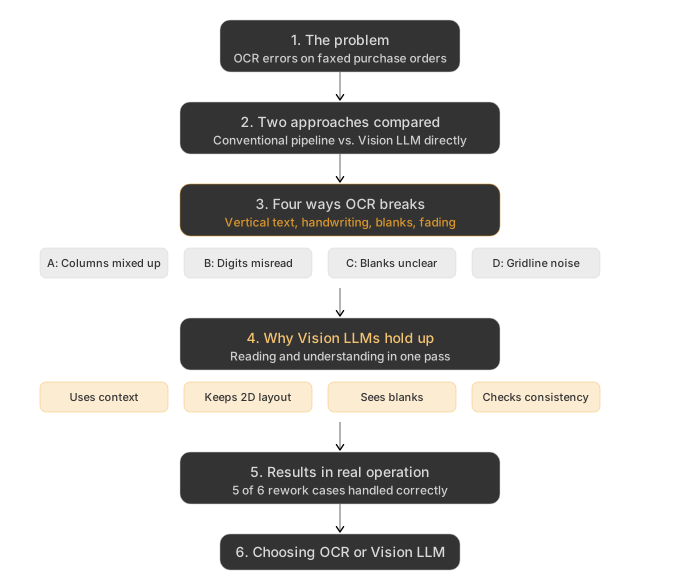
How OCR and Vision LLMs differ
OCR (optical character recognition) is a long-established technology. It has been in practical use since the 1970s, and there are now business-grade services such as Google Cloud Vision, AWS Textract, and Azure Document Intelligence. On cleanly printed standard forms, it reads text with high accuracy.
The documents a business actually receives are not always clean, though. They include handwriting, vertical Japanese text, paper faded from repeated copying, and tables with blurred gridlines. On documents like these, conventional OCR can hit a ceiling.
Vision LLMs, large language models that can read images directly, take a completely different approach.
The two approaches side by side
There are broadly two ways to design the step that turns a document image into structured data.
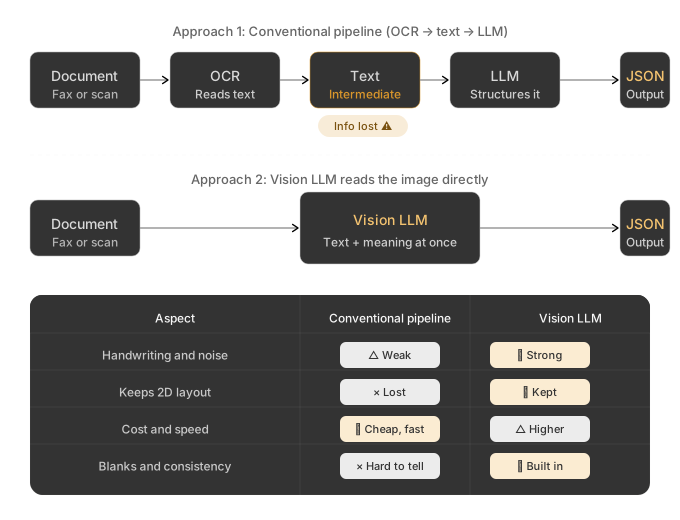
Approach 1: Conventional pipeline (OCR → text → LLM)
Document image → OCR (to text) → LLM (to structure) → JSON
OCR extracts the text, and an LLM downstream works out what each piece is (a product name, a quantity) and structures it. The roles are clearly separated, and each step can be swapped out on its own.
Approach 2: Vision LLM directly (image → structured data)
Document image → Vision LLM → JSON
The Vision LLM reads the image as is, recognizing the characters and working out what they mean in one pass, and outputs structured data directly.
A simplified implementation (sending a PNG image):
const result = await anthropic.messages.create({
  model: "claude-sonnet-4-6",
  max_tokens: 2048,
  messages: [{
    role: "user",
    content: [
      { type: "image", source: { type: "base64", media_type: "image/png", data: imageBase64 } },
      { type: "text", text: "Extract the product codes, quantities, and unit prices from this purchase order as JSON. Return null for blank fields." }
    ]
  }]
});
At first glance one diagram is just shorter than the other, but the two differ a lot in accuracy. Approach 1 converts the page to text partway through, and information is lost at that point.
Four ways conventional OCR breaks on business documents
The failures we see on business documents fall roughly into four patterns.
Pattern A: Columns get mixed up in vertically written tables
On a typical order sheet where the product name, product code, quantity, and unit price run vertically, OCR outputs the characters in reading order, and cells from different columns can end up interleaved. The downstream LLM cannot rebuild the original columns from the scrambled text, which leads to errors such as reading a product code as a quantity.
Pattern B: Handwritten digits are misread
A hastily written "2" can be read as "Z", or a "1" as "7" or "/". OCR settles its result character by character or word by word, so it does not use context from the table, such as "this is the quantity column, so it should be a number". The LLM then receives a "Z", and getting back to the original "2" is difficult.
Pattern C: Blank and unreadable cells look the same
When some cells in a table are blank, OCR either skips them or picks up noise and returns it as some character. The LLM receives either nothing or a stray character, so the information that the cell is blank never comes through. As a result, it may fill the cell in with a guess, such as the value from the row above.
Pattern D: Faded gridlines are picked up as characters
On documents that have been copied or scanned many times, parts of the gridlines look like dashes or dots. OCR picks these up as characters such as dots, dashes, or the letter "I", and meaningless noise ends up in the table. Removing that noise in the LLM stage is difficult.
Why Vision LLMs hold up on the same documents
There are four reasons Vision LLMs handle these cases better.
1. Reading the characters and judging their meaning happen together
A Vision LLM does not separate identifying the shape of a character from judging what it means. When a handwritten "2" is squashed so that it could also be a "Z", it weighs all of this together:
- the column header says "Quantity"
- the rows above and below contain numbers
- the shape is close to both "2" and "Z"
Because it does not commit to each character first, context can still settle the question.
2. The two-dimensional layout is kept
Some OCR services do return table structure, but if you pass only the text downstream, the structure (which cell belongs to which column) is lost at that point.
A Vision LLM reads the image itself, so it can use the positions on the page directly. Columns in a vertically written table cannot get shifted by a text-conversion step, because there isn't one. (This does not mean reading errors go away.)
3. Blank fields can be treated as blank
If you tell a Vision LLM to return null for blank fields, it recognizes blanks as blanks and returns null. Because it looks at the whole document, it is better at telling "could not read" apart from "nothing was written".
If you also tell it to return a separate value for fields it could not read, the next stage can tell empty fields apart from unreadable ones and handle each differently. In practice this distinction is useful. These judgments can also be wrong, though, so test them on your actual documents before relying on them.
4. Consistency checks can happen at the same time
A Vision LLM can notice inconsistencies within a document while reading it, such as a total that does not match unit price × quantity, or letters in the quantity column.
A value that makes the numbers add up is not necessarily the value written on the original, though. For order data, it is safer not to correct such fields automatically, and to flag them for a person to check against the original.
OCR has no notion of consistency, so misread characters can only be checked in the LLM stage. But that LLM only sees the text OCR returned, so it cannot go back to the shape of the character and judge again.
Real-world figures
So far this has been about how the two work. For reference, here are measured figures from the order automation system we moved from OCR to a Vision LLM (Claude Sonnet 4.6, with PDFs sent directly) for a client.
Token usage
Token usage per fax with the new setup is as follows (measured on A4 faxes of 1–3 pages):
- Input tokens: about 3,000 (the PDF image is passed as is)
- Output tokens: about 800 (structured JSON)
A Vision LLM costs more per API call than an OCR-based setup. For this project, we judged that it pays off for the operation as a whole once the reduction in rework described below is taken into account.
Checking whether rework goes down
Before deciding to switch, we took the 6 cases that had needed rework during the previous week of operation and reprocessed them with the new setup.
| Cases | Result |
|---|---|
| 5 | Extracted correctly (no rework needed) |
| 1 | The original scan was extremely poor, and hard to read even for a person |
In these 6 cases, none of the rework caused by OCR recurred with the new setup. This test alone does not show how much rework goes down across the whole operation, though.
Processing time
The new setup takes 5–15 seconds per fax (measured response time of the Claude Sonnet 4.6 Vision API).
Fax orders do not need an immediate response (received, processed in the background, then checked by staff later), so the longer processing time causes no problem for the business.
Which one to choose
Vision LLMs are not a cure-all either. They cost more than OCR and take longer (from a few yen to under 20 yen per fax, and 5–15 seconds per response). When processing large volumes of cleanly printed documents, OCR often has the edge on cost and speed, and its accuracy is enough.
The choice comes down to how noisy the documents are, weighed against how much effort it takes to fix reading errors.
| Situation | Better fit |
|---|---|
| Large volumes of cleanly printed standard forms | OCR |
| Varied documents with handwriting, vertical text, or fading | Vision LLM |
| Work where fixing reading errors later takes a lot of effort | Vision LLM |
| Work where a person checks every result at the end and few fixes are needed | OCR |
When the goal is less rework on noisy documents, as with business faxes, a Vision LLM is a strong option. Which to use should be decided by comparing accuracy, cost, and checking effort on your actual documents.
Summary
OCR and Vision LLMs are suited to different uses. The strengths OCR has built up over decades in accuracy, speed, and cost still hold, and for some uses OCR is the better fit.
On real business documents with handwriting, vertical text, fading, and blank cells, though, a Vision LLM often has the advantage, because it reads the page image directly instead of converting it to text first.
If OCR isn't reading your documents well, consider replacing it with a Vision LLM.